
1. General Information
Authors whose manuscripts receive a decision of Revision Required, Resubmit for Review, or other revision-related editorial decisions are required to revise the manuscript through the journal’s Open Journal Systems (OJS) platform or by email correspondence if the author requests editorial assistance. Revised files must be uploaded in the designated revision/review section of the submission workflow. In OJS, the review workflow is usually used to handle author revisions, and the Revisions or Upload File function is used to upload them.
2. Accessing the Revision Request
After receiving the editorial decision by email or through OJS notification, authors should:
- Log in to their OJS account.
- Open the relevant submission.
- Read carefully:
- The editor’s decision letter
- One document: #ID_BLIND MANUSCRIPT.docx (post-editorial review version and editable for #ID_REVISED MANUSCRIPT.docx and for #ID_ANNOTATED VERSION.docx)
- One document: #ID_BLIND REVIEW.pdf (Review Version)
- Two documents: #ID_REVIEW FORM_A.pdf and #ID_REVIEW FORM_B.pdf (Reviewer’s comments and suggestions)
- and any discussion messages in the workflow.
Authors must ensure that all requested revisions are addressed clearly and systematically before resubmission. OJS supports editorial communication through stage-based discussions, which form part of the submission history.
3. Types of Files to Be Submitted
Authors are generally required to upload the following revision files:
a. Revised Manuscript
Please submit the revised manuscript in an editable format (*.docx). Using the file #ID_BLIND MANUSCRIPT.docx version is mandatory. The file should incorporate all accepted revisions and only a clean version. Rename the file to #ID_REVISED MANUSCRIPT.docx.
b. Marked/Tracked Changes Version
Submit a version showing all modifications using Track Changes or highlighted text (use the Text Highlight Color tool). Using the file #ID_BLIND MANUSCRIPT.docx version is mandatory. Rename the file to #ID_ANNOTATED VERSION.docx.
c. Response to Reviewers
Submit a separate document explaining how each reviewer/editor comment has been addressed. This file is essential to facilitate further evaluation. The template is provided. Rename the file to #ID_RESPONSE TO REVIEWERS.docx.
d. Supplementary Files (if applicable)
If revision affects tables, figures, references, appendices, datasets, or ethical clearance documents, revised supplementary files should also be re-uploaded.
OJS allows multiple files to be uploaded as part of the submission and review workflow, including manuscript files, figures, datasets, and other supporting materials.
4. How to Prepare the Revised Manuscript
Authors should revise the manuscript by paying attention to the following:
- respond to all reviewer and editor comments;
- improve clarity, argumentation, structure, and academic language;
- ensure that citations and references are consistent with the journal style;
- recheck title, abstract, keywords, tables, figures, and metadata;
- ensure the revised manuscript remains aligned with the journal’s scope and template.
Where a suggestion is not adopted, the author must provide a clear academic justification in the response letter.
5. How to Write the Response to Reviewers
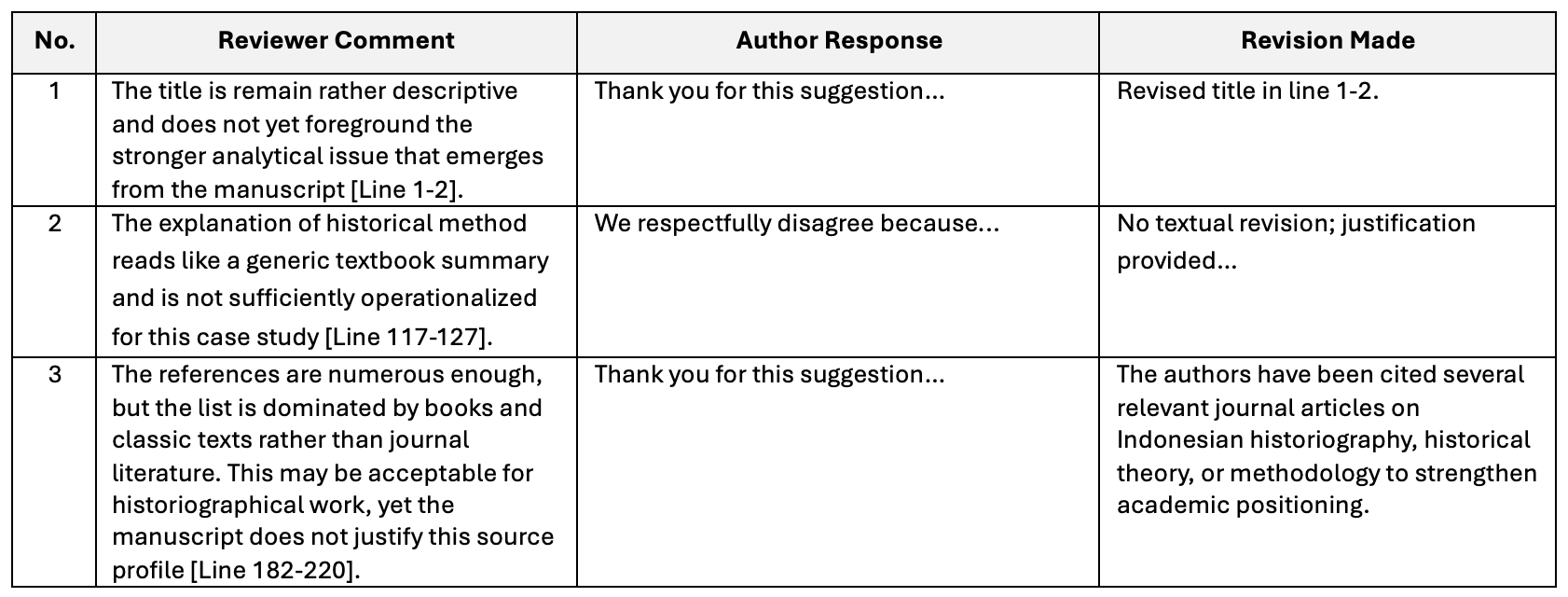
The response document should be written point by point. Each reviewer comment should be copied or summarized, followed by the author’s response and explanation of revision. Use polite, professional, and concise language. Avoid defensive responses. The purpose of this document is to help editors and reviewers verify that the revision has been completed systematically. The template is provided.
A recommended example is:
6. Uploading the Revised Files in OJS
After the revision is completed, authors should:
- Log in to OJS.
- Open the submission under review.
- Go to the Review or Revisions panel.
- Click Upload File.
- Choose the appropriate file type, such as revised manuscript/review file.
- Upload all required files.
- Confirm completion of the upload.
- Notify the editor through the discussion panel if necessary.
OJS documentation notes that in the authoring workflow, revised files are uploaded via the Revisions panel, using Upload a File, and the author selects the appropriate review file category from the dropdown menu.
7. Timeframe for Revision
Authors must submit the revised manuscript within the deadline specified in the editorial decision. If additional time is needed, authors should contact the editor through OJS discussion or email corresponding before the deadline expires.
Failure to submit the revision within the given period may result in:
- withdrawal of the manuscript from the review process,
- classification as a new submission if resubmitted later,
- or administrative rejection.
8. Important Notes for Authors
Before uploading the revised files, please make sure that:
- the manuscript title in the file matches the submission record;
- author identity is removed/blurred because the journal uses blind review;
- file names are clear and professional, for example:
#ID_REVISED MANUSCRIPT.docx [clean version and mandatory]*
#ID_ANNOTATED VERSION.docx [marked/tracked changes and mandatory]*
#ID_RESPONSE TO REVIEWERS.docx [mandatory]*
#ID_SUPPLEMENTARY FILE.docx [optional]
*Maximum 2MB in size
9. Editorial Evaluation after Revision
After the revised files are uploaded, the editor may:
- assess the revision directly,
- send the manuscript back to the same reviewers,
- send it to new reviewers,
- request additional revision,
- or make a final decision.
In OJS editorial workflow, submissions can move across stages such as Submission, Review, Copyediting, and Production, with author involvement continuing at relevant points after revision and acceptance.
10. Contact and Communication
All communication regarding revision should be conducted through the OJS workflow whenever possible, so that the editorial history remains properly documented. If technical problems occur during upload, authors should contact the editorial office by email corresponding immediately and mention:
- manuscript title,
- submission ID,
- corresponding author name,
- and a brief description of the issue.